
MQTT Broker Integration
The Embedded MQTT Broker integration provides a built-in MQTT interface within the Tektelic Network Server, allowing applications to publish and subscribe to device, gateway, and integration events without relying on external MQTT infrastructure.
This integration supports secure communication using per-integration credentials and isolated topic namespaces.
- Navigate to Integrations
- Click Create Integration
- Filled in Name field
- Select MQTT_BROKER Integration type
- Select Data Converter (only V2 converter is allowed)
- Click Save
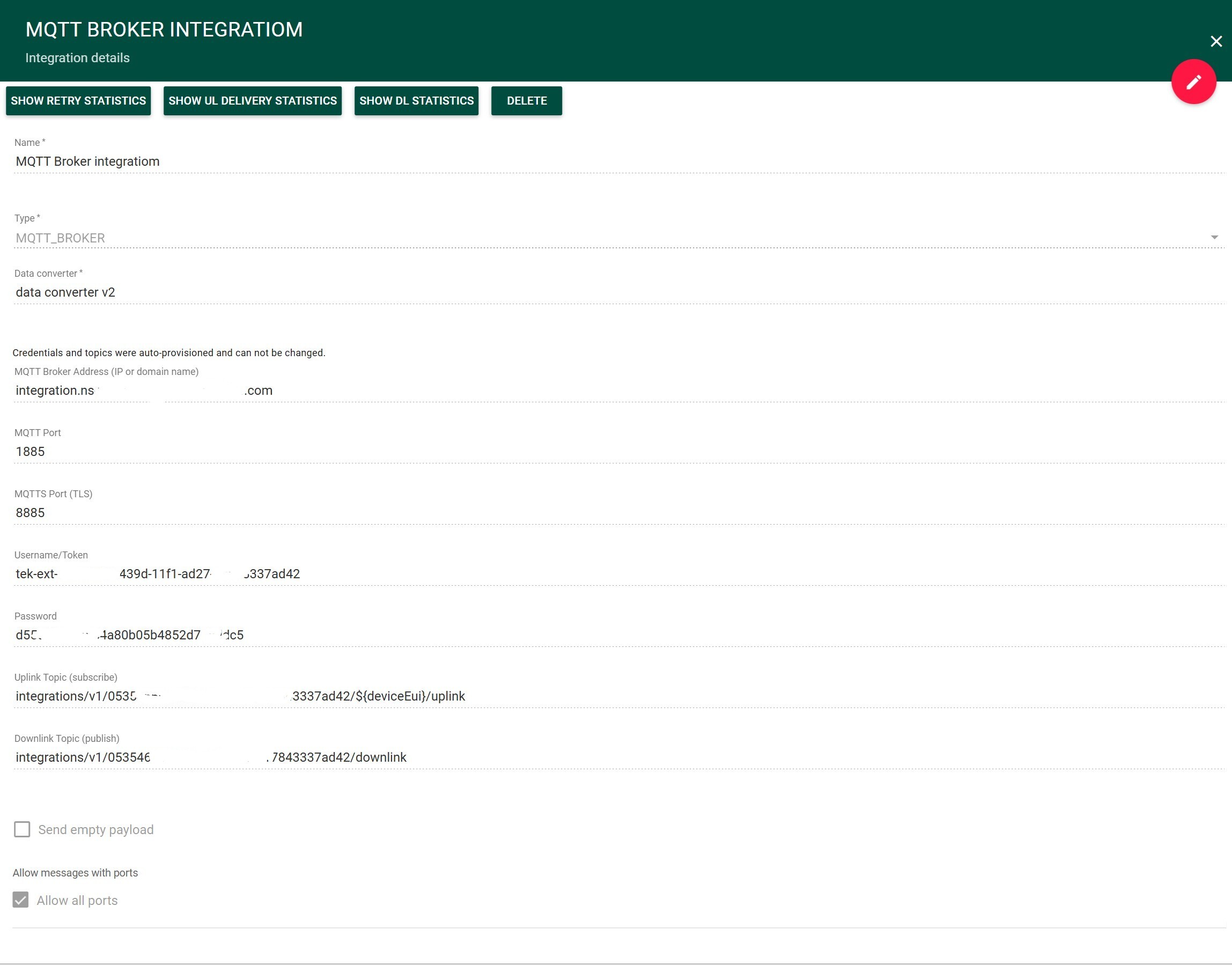
After creating the integration, the following parameters are generated:
| Parameter | Description |
|---|---|
| MQTT Broker Address | Broker hostname or IP |
| MQTT Port | Non-TLS port (e.g., 1885) |
| MQTTS Port | TLS port (e.g., 8885) |
| Username | Integration-specific username/token |
| Password | Generated API key |
| Uplink Topic | Topic for receiving uplink messages |
| Downlink Topic | Topic for sending downlink messages |
integrations/v1/{integrationId}/{deviceEui}/uplink
To receive uplinks from all devices:
integrations/v1/{integrationId}/+/uplink
integrations/v1/{integrationId}/downlink
mosquitto_sub -h <host> -p <port> -u <username> -P <password> -t "integrations/v1/{integrationId}/+/uplink"
To send a downlink message to a device, publish a message to the following topic:
integrations/v1/{integrationId}/downlink
The downlink message must contain the target device EUI, confirmation flag, message ID, and data to be processed by the configured V2 encoder converter.
Example:
{
  "deviceEui": "<eui>",
  "confirmed": false,
  "msgId": "1",
  "data": {
    "fPort": 10,
    "bytes": [1, 2, 3]
  }
}
| Field | Description |
|---|---|
deviceEui |
Target device EUI. |
confirmed |
Specifies whether the LoRaWAN downlink should be confirmed (true) or unconfirmed (false). |
msgId |
Message identifier used for the downlink message. |
data |
Object passed to the configured V2 encoder converter. Its structure is defined by the converter and is not a Base64-encoded payload. |
data.fPort |
LoRaWAN FPort to use for the downlink. |
data.bytes |
Payload bytes passed to the encoder converter. |
Note: The structure of the
dataobject is converter-defined. It should match the input expected by the encoder converter configured for the integration.
For the payload format shown above, the following V2 encoder converter can be used to pass the FPort and payload bytes to the Network Server:
var p = (input.data.fPort != null) ? input.data.fPort : 10;
return {
  fPort: p,
  bytes: input.data.bytes,
  errors: [],
  warnings: []
};
In this example:
input.data.fPortspecifies the LoRaWAN FPort.- If
fPortis not provided, port10is used by default. input.data.bytescontains the downlink payload as an array of bytes.- The converter returns the format expected by the Network Server.
mosquitto_pub -h <host> -p <port> -u <username> -P <password> \
-t "integrations/v1/{integrationId}/downlink" \
-m '{"deviceEui":"<eui>","confirmed":false,"msgId":"1","data":{"fPort":10,"bytes":[1,2,3]}}'
- The
datafield is a converter-defined object and is not a Base64-encoded string. - The structure of
datamust match the input expected by the configured V2 encoder converter. - Invalid JSON payloads or payloads that cannot be processed by the configured converter will not produce a valid downlink.
- Downlink messages may not be delivered immediately.
- Delivery depends on the device activity and available LoRaWAN receive windows.
- Messages may be queued until the next available receive window.